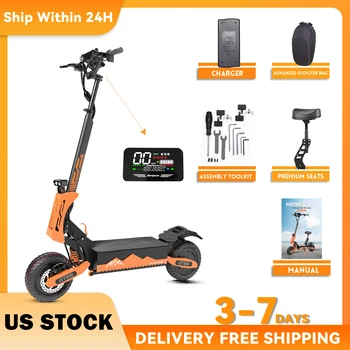
The Arwibon GT08 isn't just a scooter; it’s a high-performance electric vehicle designed for riders who demand extreme power without the $3,000 price tag. With a dual-motor setup delivering a staggering 5600W, it competes directly with premium brands while maintaining an entry-level price point.
Key Specifications at a Glance
|
Feature |
Specification |
|
Motor Power |
5600W Dual Brushless (2800W x 2) |
|
Top Speed |
40–46 MPH (GPS verified by users) |
|
Battery |
60V 27Ah Lithium-ion |
|
Range |
25–40 Miles (dependent on speed/weight) |
|
Tires |
11-inch Vacuum Off-Road Tires |
|
Max Load |
440 lbs (200 kg) |
|
Brakes |
Front & Rear Oil Hydraulic + Electronic |
|
Weight |
~95 lbs (43 kg) |
Performance: Speed & Torque
The standout feature of the Arwibon 5600W is its raw acceleration.
- The "Kick": In Dual Motor mode, the front wheel can spin on takeoff. It reaches 30 MPH in seconds and can conquer 45–50° inclines where standard commuter scooters would stall.
- Ride Modes: It features a 3-speed system. Most users report that "Gear 2" is plenty for urban commuting, while "Gear 3" is reserved for open roads and speed enthusiasts.
Build Quality & Design
Commonly described by reviewers as being "built like a tank," the GT08 uses a reinforced aluminum and iron frame.
- Stability: The 11-inch off-road tires provide a "Cadillac-like" ride, soaking up potholes and gravel with ease.
- Visibility: It comes with a 360° lighting package, including powerful dual headlights, side-skirt LEDs (in orange/yellow), and integrated turn signals.
- Convenience: The scooter includes a detachable seat and a folding mechanism for transport—though at 95 lbs, it is a heavy lift for stairs.
Real-World Pro Tips for New Owners
Based on 500+ reviews, here is how to get the best experience out of your Arwibon GT08:
1. Handling the "Death Wobble"
At speeds above 35 MPH, some riders experience steering vibration.
- Solution: Invest in a steering damper (345mm is the recommended length).
- Adjustment: Tighten the main stem bolts and ensure your handlebars are perfectly aligned before your first ride.
2. Battery Management
While the battery is 27Ah, riding at full throttle in dual-motor mode will drain it faster.
- Sweet Spot: Riding between 25–35 MPH typically yields a range of 35+ miles.
- Software Tip: The center display might stay in KMH, but the smaller trigger-throttle LCD can often be toggled to MPH via the "P-settings."
3. Safety First
This is not a toy. The torque is instantaneous and can be intimidating for beginners.
- Gear: A full-face helmet and pads are highly recommended.
- P-Setting Hack: If the takeoff is too jerky, you can adjust the "P-code" for start-up strength to make the acceleration smoother.
The Verdict: Is It Worth It?
For under $700, the Arwibon GT08 offers a price-to-performance ratio that is currently unmatched. While it may require some "wrenching" (tightening bolts and basic tuning) out of the box, it provides the speed and hill-climbing power of scooters triple its price.
Pros:
- Unbeatable price for 5600W power.
- Excellent suspension and off-road capability.
- Highly customizable (P-settings and physical mods).
Cons:
- Heavy weight makes it less portable.
- Requires a steering damper for high-speed safety.
- Battery range drops significantly at top speeds.
How to Access the Menu
Turn on the scooter.
Hold the Power and Mode buttons simultaneously for 3–5 seconds.
Once the screen changes to show a "P" followed by a number (e.g., P01), you are in the menu.
Navigate: Use the Power button to cycle through the P-codes (P01 to P20).
Adjust: Use the Mode button to increase values (some versions use Power to decrease).
Save: Hold both buttons again or wait 10 seconds for it to time out.
Arwibon GT08 P-Settings Guide
| Code | Function | Recommended Value / Default |
| P01 | Screen Brightness | 1 (Dim) to 3 (Brightest) |
| P02 | Speed Units | 0 for KM/H |
| P03 | Battery Voltage | Set to 60V (Do not change) |
| P04 | Sleep Timer | 0–60 minutes (default is usually 5) |
| P05 | Gear Level | 0 (3-speed) |
| P06 | Wheel Diameter | 11.0 (Vital for speed accuracy) |
| P07 | Magnetic Steel | 18 or 20 (Adjust to calibrate speedo) |
| P08 | Speed Limit | 0–100 (Keep at 100 for full power) |
| P09 | Start Mode | 0: Zero Start |
| P10 | Drive Mode | 0: Front only |
| P11 | E-Brake Strength | 1 (Weak) to 5 (Hard) — 3 or 4 is best |
| P12 | Acceleration | 1 (Soft) to 5 (Aggressive) — 5 for max torque |
| P15 | Low Voltage Cutoff | Set to 48V or 52V to protect battery |
| P16 | Odometer Reset | Hold Mode button for 5 seconds to clear |
| P17 | Cruise Control | 0: Off |
Critical Tuning Tips
MPH Change: Note that changing P02 to "1" often only updates the smaller throttle screen. Many users report the large center display stays in KM/H (even if it says "mph").
Torque Control (P12): If the scooter "jerks" too hard when you pull the throttle, lower P12 to 2 or 3. This will make the takeoff much smoother and safer for city riding.
Safety (P09): I highly recommend setting P09 to 1 (Kick Start). Because the GT08 has immense torque, a "Zero Start" can cause the scooter to fly out of your hands if you accidentally bump the throttle while standing still.
Speed Accuracy: If your speedometer feels "off" compared to a GPS app on your phone, adjust P07 up or down by one digit until they match.
